PCM + ICM Final Wk 10: Proposal, Prototype, Production, Process

Updates on Week 10
a.) Project Proposal
b.) Schematic Diagram
c.) Diagrams for Production
d.) Timeline + Bill of Materials
e.) Prototypes
f.) Analog Input
g.) Web Design


a.) Proposal Presentation:

This proposal pdf was put together for ICM, but serves as a helpful guide of the project’s why, what, for who, and how.

Solar_Proposal_Presentation_20181113 EL2


b.) Schematic Diagram:

20181112_display_diagram_v2-04

c.) Diagrams for Production

diagram display20181112_display_diagram_v2_frontdiagramThe below image is the original diagram drawn for the version of the house with a lamp and fan. This plan has changed. See new diagram below.

20181112_display_diagram_v2-05.jpg

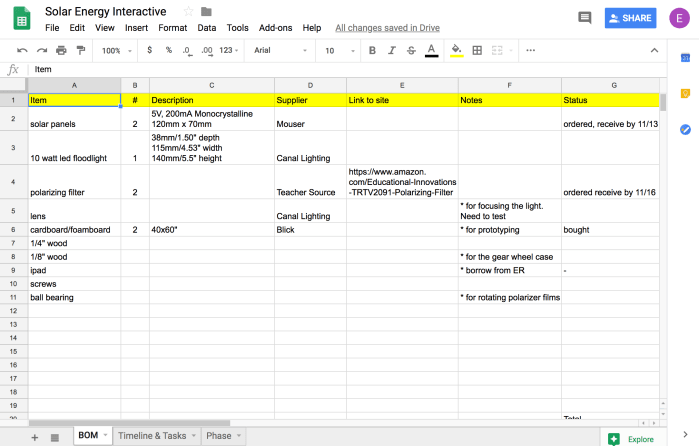
d.) Timeline + Bill of Materials: https://docs.google.com/spreadsheets/d/1zA4OJrYoYLFRfl6XcdlWMDRCV-Dq8sbgWobO5o2G_kc/edit#gid=0

Screenshot 2018-11-12 15.48.58

timeline and tasks

Screenshot 2018-11-12 15.49.10

bill of materials


e.) Prototype:

Initial cardboard prototype to better understand the scale, proportions and positioning. The house is missing from this because I realized that the house would need to hide the wires of the fan and lamp as well as the Arduino.  I found a ball bearing at Canal Plastics that I thought would work great for the polarizing filters.

cardboard prototype

Here are some process photos, which include the sketches with rough dimensions.


Prototype of the house:

Knowing what to do with the house has been tricky. I did this wooden prototype but felt that it was too tall. I did a cardboard version that had an attic and an extra bottom layer so that I could hide the motor and the arduino and lamp. What I don’t like about both designs is how much shadow is created by the roof. The lamp and fan will be barely visible when seen from above. See images below.


So after doing these prototype houses I decided to switch the design of the house so that it will not have the front open. Instead, there will only be windows that will dim or light up depending on the reading from the sensor. This change was also partially influenced by this inspirational piece below. This simply and beautifully communicates the idea.

http://www.hashemjoucka.com/work#/wind-turbines-interactive/


f.) Analog Input with Light + Solar Panel:

First was following along analog input to serial lab again in order to have the p5js sketch communicate with the serial connector and arduino. Below is the video for that


Below is the video and arduino code that reads the analog input from the solar panel and writes analog write (PWM) to have the LED light correspond to the sensor reading.


p5js code: https://editor.p5js.org/elinsterz/sketches/ryirTRP6Q

Arduino code:

“void setup() {
Serial.begin(9600);
pinMode(9,OUTPUT);
}

void loop() {
int solar = analogRead(A1);
int mapSolar = map (solar, 0, 1023, 1, 255);
Serial.write(mapSolar); //translates to binary

analogWrite(9, mapSolar);

}”


h.) Web Design

Rough look and feel of the diagram and site is below. Steps will be revealed when the user hovers over the number icon. The motion of: photon —> electron-hole pairs –> traveling through circuit –> reunite at the rear will still continue and be dependent on how much light is showing through.

rough skin design

Fab Wk 2: Modular

For this week’s assignment to make 5 identical objects, I decided to make hexagon ping pong paddles! The final result is below.

pp_single_4

pp_five


Process:

Originally, I was planning to do five bird houses, and even got so far as doing 1 birdhouse. See image below.

IMG_2706

I was not happy with the end result of the first birdhouse, so immediately switched to my more feasible plan B.

For the ping pong paddles, I decided to make them hexagonal because: a.) it’d be fun to make “designer-y” ping pong paddles that weren’t the typical oval shape, b.) I am not yet skilled or comfortable enough to do perfectly symmetrical rounded shapes. With that in mind, I began!

1.) Draw a template for myself in illustrator. The sizes were based on an online template I found. However, that version was much more curvy and made for a CNC router. I just needed the dimensions.

Screenshot 2018-11-09 10.59.16

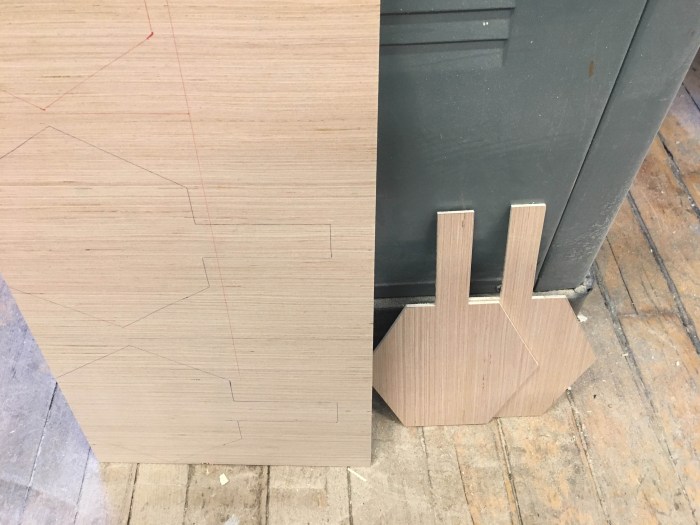
2.) Then, I printed the paper out, traced it on the wood and began cutting the overall shape and the rectangular handles individually. I used the bandsaw to cut because the wood I got (1/8″ plywood is very soft). When I used it on the chop saw, too much of the wood would disappear.

pp_outline_beforecut

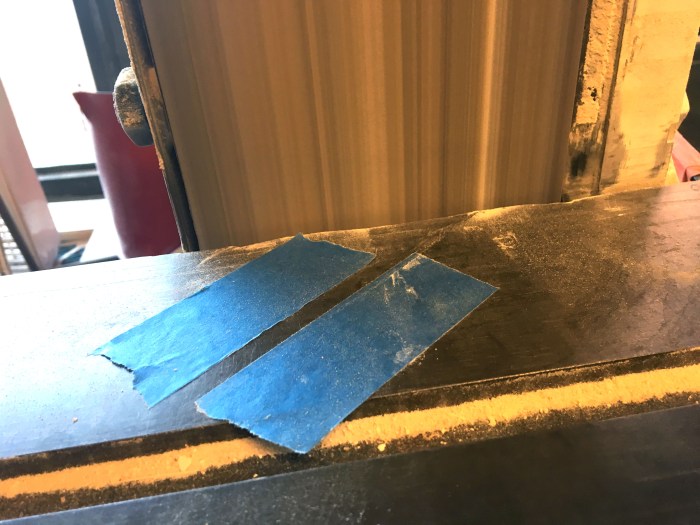
3.) I then cut the handles and created an angle using the sand blaster. I tried to create the same angle for the handles by sticking an angled piece of tape to the machine. See image below. Not sure if there was a better way to do this (there probably is).

process_1.jpg


4.) I went to Canal Rubbers (amazing store, btw!) to get some rubber for the ping pong paddles. It’s so great over there! They have so many choices, tons of colors, and knowledgeable people working there. After my trip there, I started to cut and glue the rubber to the ping pong paddles. I first traced the ping pong paddle onto the back of the rubber. Then I used rubber cement to glue to stick the cutouts onto the wood.

It was so fun to do stripes and different colorful designs for it.

process_2


5.) After gluing the rubber, I stuck the 2 handles to the sides using wood glue. I taped it together to have it dry nicely. In hindsight I should have clamped it down.

6.) Then I sanded  the handles. Some of them I used the sand blaster to sand, which I now think was not the smartest thing for me to do because it made a weird groove when I sanded too much. So, I then hand sanded it to create a nice smooth paddle. Below is the result.

pp_single_4

PCM Wk 9 Final: System Plan, Timeline, Materials

Solar Energy Learning Table

Idea: 

I aim to create an interactive learning table that explains how solar panels work and how energy is converted into electricity.

Specific Points to Communicate:

Main objective: Learn about the science of solar cells and how it can impact our lives if we incorporate it into our lifestyle.

1.) Science of solar cells: how light is turned into electrical energy through the use of semiconductors.

2.) Prove that solar energy can impact our lives by symbolically showing how much energy a rooftop solar panel will generate for a small size house.

3.) Show the effect of light on solar cells by altering the intensity of light through polarizing  filters and rotation of light. Show schematic of what happens scientifically when light hits the cell.

4.) Provide a thought experiment: what if the sun were red, green, blue, purple? Which color would give the most or least amount of energy?

5.) Show the way battery storage works and how solar panels can still run even when there is not sun. This will be achieved by having a battery icon that users can select to power the house even when there is no light that shines.

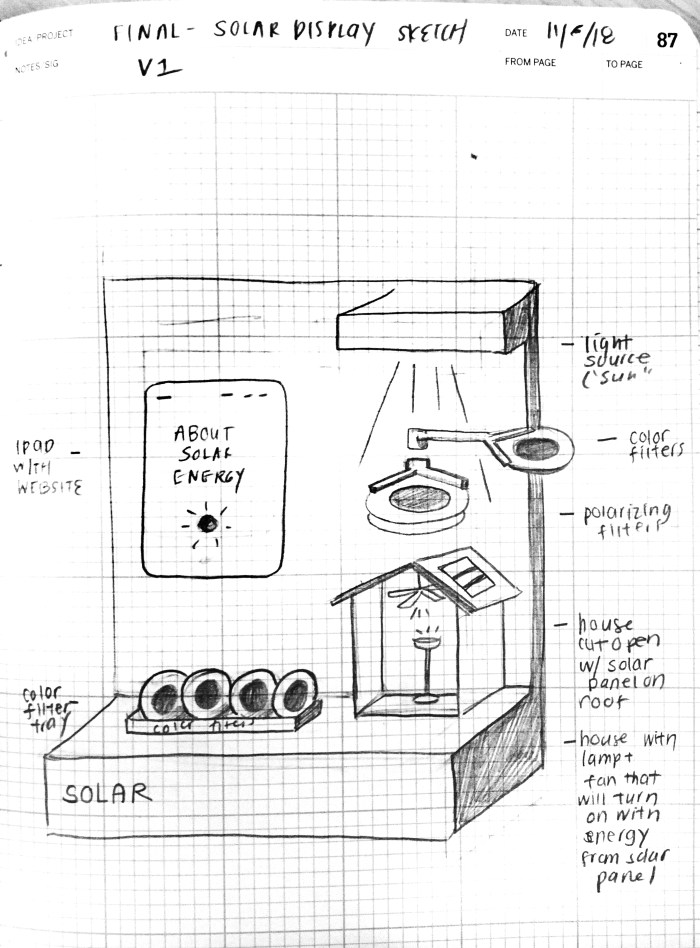
Sketch:

solar display diagram


b.) Timeline:

Week 9 (10/31/18 – 11/07/18):
–  continue user interviews, gathering info, and experimenting (PCM)
–  run light + filter experiments (PCM)
–  finalize content (what I want to communicate) (ICM)

Week 10 (11/7/18 – 11/14/18):
–  build the circuit and connect with p5js sketch(PCM)
–  prototype fabrication of display (PCM)
–  finalize idea and design of display (PCM)
–  finalize content, design and UI of website (ICM)

Week 11 (11/14/18 – 11/21/18): 
– combine fabrication, circuit and website (PCM)
– continue fabrication (PCM)
– continue programming the website (ICM)

Week 12 (11/21/18 – 11/28/18): 
– combine final components – finish! (PCM)
– finish the website (ICM)

Week 13 (11/28/18 – 12/05/18):
– final
– user testing
– tweaks based on user testing

Week 14 (12/05/18 – 12/12/18):
– final final
– documentation


c.) Materials:
(More details will be added)

  • cardboard for prototyping
  • wood (still need to figure out which kind)
  • polarizing filters
  • color filters
  • white LED light source
  • 2 or 4 solar panels
  • led light (for lamp inside house)
  • dc motor (for fan inside house)
  • iPad


PCM Wk 9 Final: Light + Filter Experiments

Experimenting with Lights and Filters

1.) First we prepared our equipments, filters and notes. Equipments include: a laser pointer, an LED flashlight, polarizing filters, solar panels, color filters.

This slideshow requires JavaScript.

2.) Next was experimenting with the polarizing filters to manipulate the amount of light that passes through. Polarizing filters may give us more range than neutral density filters, but this can’t be determined until the neutral density filters are tested. See video below.


3.) Using a multimeter we tested how much voltage was being generated by the solar panel under different lighting conditions (with and without color filters).

a. Solar panel under normal room lighting and under white LED light

b. Solar panel under white LED light with different colored filters, starting from the colors with larger wavelengths to shorter wavelengths (red, yellow, green, blue, purple). The yellow and the blue turned out to be generating the most voltage.

This slideshow requires JavaScript.

4.) Following the same procedure as above, we tested the amount of current that was being generated by the solar cells.

a. Solar panel under normal room lighting + white LED light

b. Solar panel under white LED light with different colored filters, starting from the colors with larger wavelengths to shorter wavelengths (red, yellow, green, blue, purple).

This slideshow requires JavaScript.

What we discovered: the color filters block out some of the light. The yellow filter blocks out the least amount of light. The red is the largest wavelength so its frequency is the lowest. This information correlates with the amount of energy that it generates.

f.) Using analog read, we were able to find out and translate the solar panel’s energy with ASCII.

Screenshot 2018-11-06 01.20.28

analog read screenshot

IMG_5002

circuit for connecting solar panel to analog pin

Here is the code that mapped the sensor value from 30 – 400 to 0-1023, so we could get a more accurate reading.

“// Analog Input from LED Light to Silicon Solar Panel

int mapThis;

void setup() {
Serial.begin(9600);
}

void loop() {
int sensorValue = analogRead(A0);

//to have a wider range and higher sensitivity
// map 400 (our potentially highest reading) to 1023
mapThis = map(sensorValue, 30, 400, 0, 1023);

//prints out ASCII
Serial.println(mapThis);
delay(500);
}”

*** Next steps are to connect the readings to a p5js sketch so there is a visual to help illustrate the readings, do the Synchronous Serial Communication lab, and use the flux sensor. To be updated by soon.


*** Full disclosure: for my research and experiments with solar energy and light, I am learning from and collaborating with Dr. Sardashti (Kasra), a material scientist and applied physicist, whose has done research on solar cells.


To do list for this week (10/31/18 – 11/6/18): 
a.) figuring out what to communicate (user interviews)
b.) gaining inspiration from a math or science museum
c.) researching + experimenting with different light conditions + filters
d.) doing the synchronous serial communication lab
e.) drawing a new diagram of the interactive table
f.) building a prototype house (also for fabrication)
g.) creating a timeline/ game plan / materials list
h.) meeting with experts, itp professors, and residents in this field

ICM Wk 8: Media

For this week’s assignment to create a sketch that uses external media (sound, images or video), I decided to do a piece using a song and the video camera.

The final code is here: https://editor.p5js.org/elinsterz/sketches/SkKJAW0hm

Below is a video of the piece:


Process:

This time around, instead of sketching out my plans for the homework, I decided to go off script (shocker)!  I had no plans going into this particular piece – I  just tried to have fun with it. Lately, I’ve been feeling uptight and pressured to get a lot right and learn a lot fast that I decided I wouldn’t put pressure on myself to make sure my ICM final code matches up with my initial sketches. I’m sure there will be a time and place for making sure that I can execute what I intend to, but honestly, I wanted this to be fun to make and cathartic (keeping in the spirit of ICMadness).

With this in mind, I took two of my follow-along codes from one of the Shiffman’s Coding Train videos and messed around with it. Here is the video camera code that I started off with: https://editor.p5js.org/elinsterz/sketches/B1ZSY8Tn7

I also had my follow-along code from the sound tutorials:
https://editor.p5js.org/elinsterz/sketches/SJQ2bopn7

https://editor.p5js.org/elinsterz/sketches/HktTfsp3Q
These tutorials all use the same song: “Juju” by Ras. I’ve been obsessively listening to it lately. Even after this homework assignment of listening to it chopped up and rewinded via p5.js, I’m still not over it!

So from there, it was an unpredicted progression of trying to improve the sketch to my liking. The general idea is that these sliders control both the visuals and the way the song is played. For instance: 1.) the volume correlates with the saturation of colors, 2.) the height shifts in placement (and was supposed to correlated with the panning between left and right, 3.) the speed correlates with the width of the copied rectangle.


See code and videos below:

a.) https://editor.p5js.org/elinsterz/sketches/BymqO2anQ


b.) https://editor.p5js.org/elinsterz/sketches/SJWvX6anm


c.) https://editor.p5js.org/elinsterz/sketches/ryw0bJAnQ


d.) After a certain point I just stopped tweaking, because I felt like all my changes were minor and not making a big difference.

The final code is here: https://editor.p5js.org/elinsterz/sketches/SkKJAW0hm

Reflections

I have to say I really had a lot of fun with this one. Instead of banging my head up against the wall (at some point) like I normally would. I just went with the flow and got lost in listening to the song and trying to make it something as visually soothing as it is sonically. It was a nice change to not force myself to get it “perfect” and “right” this time. And I have to say I personally enjoyed messing with the song settings to change the graphics. I should do more of these music + graphic + code mix ups. This was a healthy break before the final!

PCM Final: Research + Resources

Ongoing list of research links, videos, images related to solar energy and light:
(this will be updated constantly)


Fab Wk 1: Flashlight

Final Result: 

IMG_2663

For this first assignment to make a flashlight, I knew I wanted to do something boxy and minimal. This is partly due to my current skill limitations in the woodshop ( i have yet to learn how make anything remotely round using wood) and my preference for clean-looking aesthetics. I also wanted to give myself the design constraint of spending under $15 on this. And with these goals in mind, I started my flashlight!

Process: 

1.) First I started out sketching my circuit schematic and some rough sketches of what I wanted it to look like. I included a potentiometer as a dial in my piece.

I also decided on using the top of the water bottle as my flashlight’s top. I liked the round dome like shape of the water bottle, and I have so many water bottles at home waiting to be used or recycled. So I decided on this sketch below.

This slideshow requires JavaScript.

2.) The I went to Tinkersphere to get the lamp bulb holder, the led lamp, and the dial cap for the potentiometer. These all ended up being $11! The rest of the materials (wood and acyrlic) I both found in the junk shelf and also had scraps of wood from a previous pcomp project.

3.) Next was prototyping using cardboard and the water bottle. My process for this was to a.) get precise measurements of the potentiometer dial, dimension of the bulb holder top, b.) mocking the box up in illustrator, c.) laser cutting it using cardboard

See photos below for process on prototyping:

4.) Next was testing out the water bottle flashlight top idea. It ended up looking to rough and imperfect for me. See photos below

This slideshow requires JavaScript.

5.) It was very helpful to prototype because I realized I had put the circle hole for the potentiometer dial in the wrong spot. It was on the bottom when it should’ve been on the side. Another realization was that the water bottle looked cheap and not great. Instead I went with another design I had in mind. I decided to use some scrap acrylic to make a clear top for the box. I made readjustments to the illustrator file, then laser cut the wood and acrylic, and assembled it all together with wood glue and acrylic glue. See images below.

This slideshow requires JavaScript.

6.) During this time of waiting for the glue to dry I also soldered my wires. (Forgot to take a picture of this, but here is a picture of the full circuit soldered together.)

img_2650.jpg

6.) As a test ( I don’t spray paint often), I tried out spray painting the wooden box. Oi! This didn’t look good. I don’t think I should’ve used white spray paint. It shows the flaws of the box and the teeth more. Also the spray paint I was using was not coming out properly, it was very leaky and was more liquid-y than I’d like. So I think I will need to sand it off tomorrow and respray paint. See images below of how ugly the box now looks with the white spray paint.

8.) I sanded the top acrylic to create a diffuse effect.

9.) I sanded off the spray paint and respray paint it with a new spray paint I bought. Unfortunately this brings up the cost of my total project to be a little more than $15.

PCM Wk 8.5: Final Project Reflections

10/31/2018

Since the last class (before meeting with Professor Tom for office hours), I felt lost about what to do with this idea. I knew I wanted to deal with the topic of solar energy as it is a topic I feel compelled to better understand. One of the best part about designing is being able to learn about new subject matters that I am not an expert on but am interested in. This is what I was hoping to do with this project – use this as an excuse to learn about an important, , fascinating and extremely relevant subject. However, I am still in the process of learning about how they work.

For next steps, I definitely need to do more research by collaborating with more experts on this topic, figure out what should be addressed in this interactive? Who is this for? What do I want the interactive to communicate? And then figure out the technology and visuals for it.

After doing a little more research and talking with helpful ITP resident Jasmine (someone whose focus is on energy), she brought up the interesting challenge of solar energy is their storage. She mentioned the duck curve (see videos below for reference). Apparently, solar energy is being wasted because these traditional power plants and power grids don’t have enough storage to handle the peak times when the sun is shining the most (which is midday). However, a solution could be having local energy storages like batteries that can hold the excess energy that is received during the day and be able to output this energy at night (when the solar panels are not in use).

Option A: 

Maybe the final project could present this solution of storing solar energy in a residential batter and also explain the challenge of storage within solar energy. Quick sketch of an idea below:

IMG_2638


Resources + Research: 

Helpful reading material on solar energy: https://www.pveducation.org/
(It’s taking me a while to get through this material, but I’m hoping to chip away at it bit by bit).

Video research on solar energy:


Some Inspiration:


PCM Wk 8: Final Project Proposal

Idea: Solar Energy Learning Table

I aim to create an interactive learning table and display that helps myself and others better understand how solar panels work and how energy is converted into electricity.

Objectives: 

1.) Learn about the science of solar cells: how light is turned into electrical energy through the use of semiconductors.

2.) Show that solar energy is sustainable and green.

3.) Create a hands-on instructional display to show the effect of light intensity on power generation of solar cells by altering the intensity of light through (polarizing/ neutral density/ color) filters and rotation of light.

Description of rough idea:

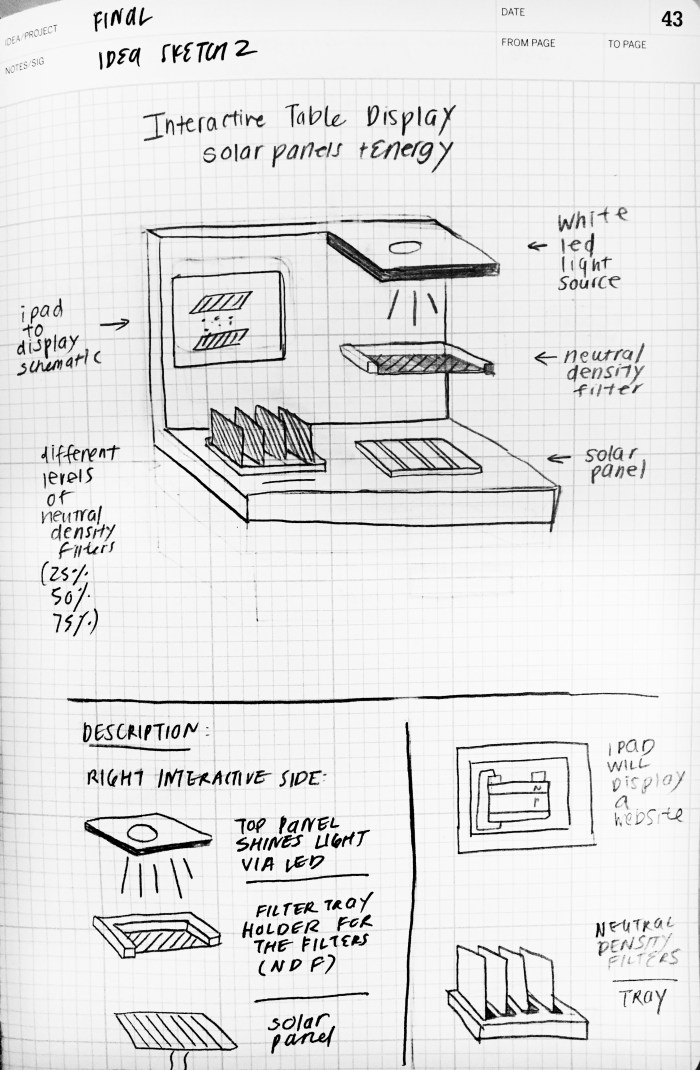
On the right side of the display is an interactive that that has a white LED light source at the top. The LED light will shine on the Neutral Density Filter (NDF), which will then shine on the solar panel. These filters reduce the amount of light passing through without changing the color. Depending on the transmittance of the NDF, the amount of light that passes through will differ; this will effect the amount of current generated by the solar cell. We will measure the current using analog read. This sensor reading will effect the diagram drawn on p5.js sketch that is running on a website. The p5.js sketch will show that when there is more light shining on the solar panel, a  larger number of charge carriers is generated and flowing through the circuit.

Bonus feature: After a certain number of seconds, the screen will change to reveal how much energy is generated in that time span when using the specific filter chosen by the user. For example, the screen may say: ” Using this solar panel, you have generated enough energy to power a lightbulb/ cell phone.”

Still trying to work out this bonus feature. Perhaps the timer is counted when the LED light switch is turned on.

Sketches + Diagrams:

a.) Rough sketch of the display’s form with short descriptions of each component (all is subject to change)

pcomp final sketch of display

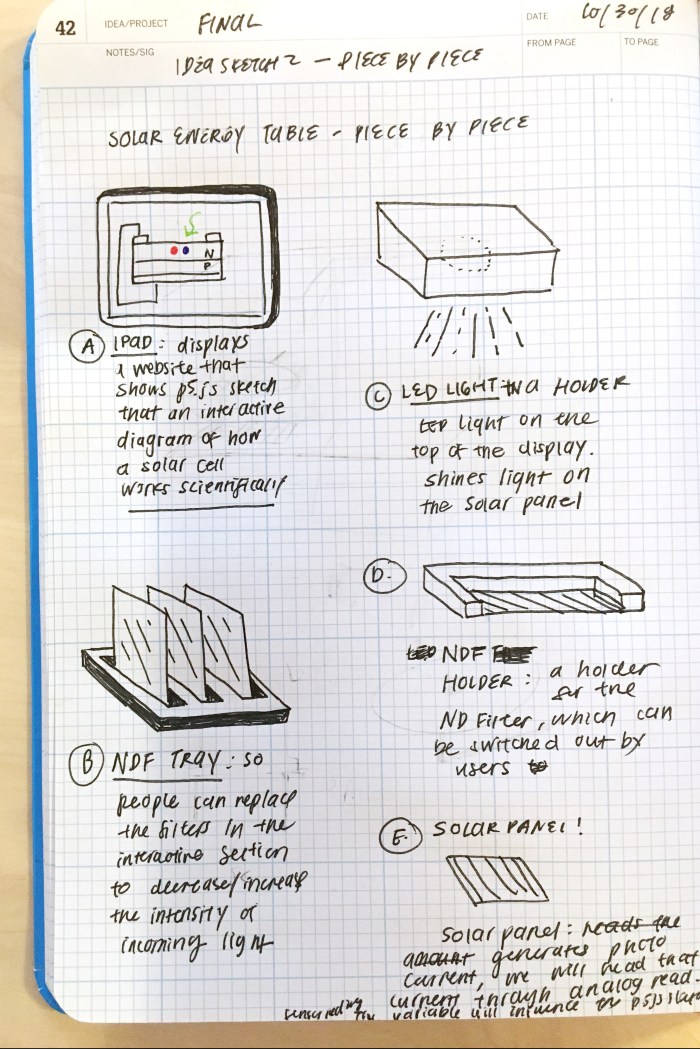
b.) Sketch of each component with more detailed descriptions

sketch of each component and its function

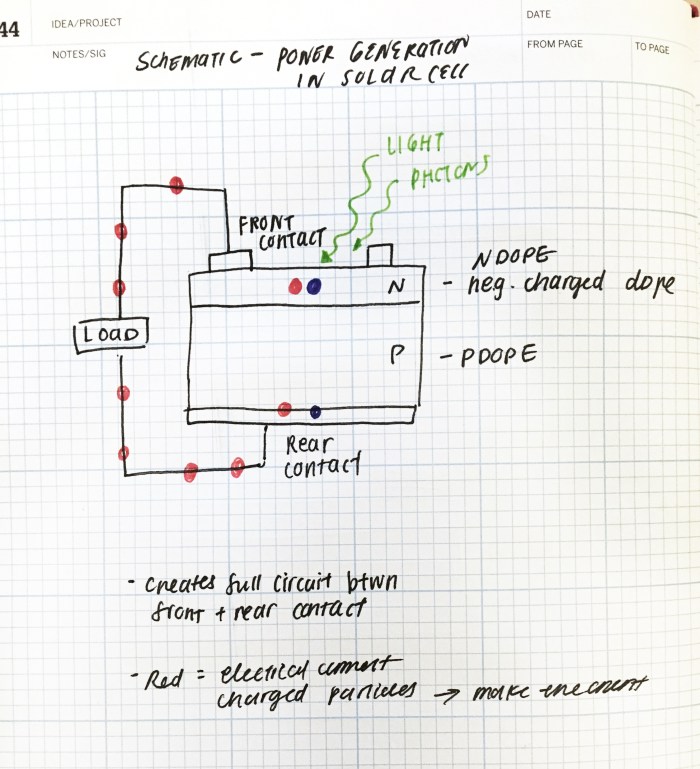
c.) Diagram of how a solar cell absorbs light and converts it into energy.

pcm_final_idea_sketch_2

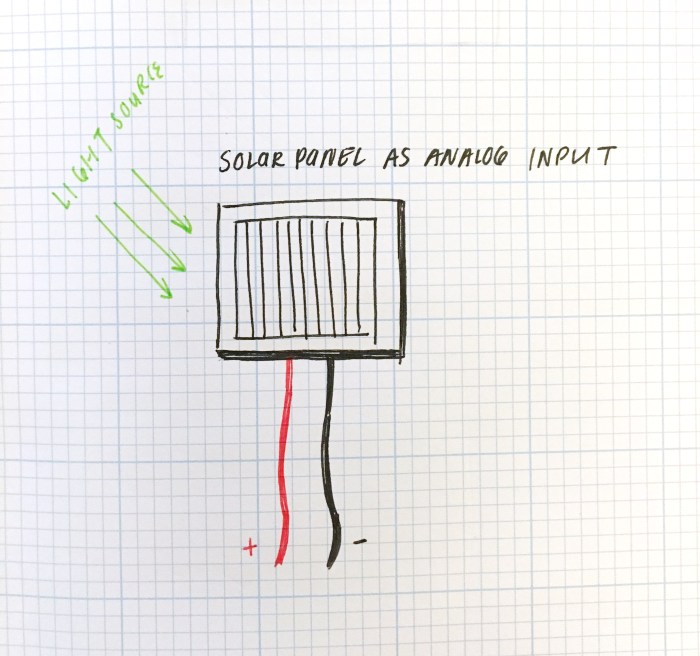
d.) Solar panel will be my light intensity sensor.

solar panel

Resources + References:

PCM Wk 8: Transistors, Relay, Motors

Controlling High-Current Loads

Notes:

  • For controlling devices that need more electrical current than micro controllers can supply, we can use 1.) relays, 2.) transistors, 3.) optoisolator
  • Relays – devices that control a switch through magnetism; a little slower to close ( a few miliseconds delay)
    • 2 types of relays: electromechanical, solid states
      • solid state relays: metal contact switch; able to control AC
      • electromechanical: using magnetic field to close the switch
  • Transistors: used for switching a higher current circuit rapidly; they are electronic devices that can work as a switch; faster than relays
    • allows control of larger current by a smaller current
    • 3 connections: 1.) base, 2.) collector, 3.) emitter
  • 3 differences between relays & transistors:
    • motor as load; motors are inductive loads –> creates a reverse voltage when spinning
    • protection diode: in parallel with transistors; protection diodes routs any reverse voltage around the transistor to protect it
    • microcontroller : attached to the base/gate. transistor’s emitters and base must have a common ground
  • Helpful Tip: ” if you are switching DC motors, solenoids, or other high-current DC devices which create motion, it’s better to use a switching transistor than a relay”

Questions:

  • It says ” One of the main differences between MOSFETS and bipolar transistors is that MOSFETS require negligible current on the base in order to activate.” What does “negligible current” mean?
  • Need to better understand transistors and how the base, collector, emitter work.
  • Why are MOSFETS using the term “drain”, “source” instead of “emitter” or “collector” like the bipolar transistors? Why the different names if they are doing the same thing? Are they doing the same thing?
  • When do I know when I should use a transistor versus a relay switch? Is there a best practice for when to use which?


DC Motors: The Basics

Notes:

  • H-bridge to control a DC motor from a micro controller. H-bridge chip includes diodes to protect the transistor from back voltage
  • DC Motor’s speed is proportional to the supplied voltage
  • Best way to adjust speed is by using PWM (~ on the Arduino)

Questions:

  • Regarding: “The top two transistors above are P-channel, meaning that they allow current to pass when and the bottom two are N-channel, so that the proper two transistors always switch together. When the left control pin is high, transistor 1 (labeled Q1) turns off because it’s a P-channel and Q2 turns on because it’s an N-channel.  The same happens with Q3 and Q4. If you were using this circuit, you’d want to make sure that the control pins are always reversed; when one is high, the other is low” , I don’t think I understand this.

Meet the Motors

Notes:

  • all motors mentioned in the video use electromagnetism
  • Actuators: devices that turn energy into motion (i.e. motors)
    1. solenoids:
      • converts electricity to motion
      • coils are concentrated electromagnetism
      • “a cylindrical coil of wire acting as a magnet when carrying electric current.”
    2. DC motors:
      • rotor inside; the wires are makes sure polarity is always alternating
      • generally, high speed, low torque
      • reversing polarity –> reverses direction
    3. Gear head (another type of DC Motor):
      1. slow speed, head torques
    4. Stepper Motor (another type of DC Motor):
      • inside out DC motors
      • permanent magnets on the shaft
      • coils arranged on outside
      • moving by steps
      • controlled motion / able to move 360 degrees
    5. Servo Motors:
      • limited range
      • Duration of pulse corresponds with the position we want servos to take

Controlling Stepper Motors

Notes:

  • stepper motors rotate a full 360 degrees, but unlike dc motors, they can be positioned at a particular angle
  • stepper motor: a motor controlled by a series of electromagnetic coils; center shaft has a series of magnets mounted on it
    • coils surrounding the shaft are alternatively given current or not–> this creates magnetic fields which repulse or attract magnets on a shaft
  • 2 types of stepper motors:
    1. unipolar stepper motors:
      1. 5/6 wires
      2. 4 wires = 4 coils connected by 1 pole
    2. bipolar stepper motors:
      1. 6 wire motors: 2 coils divided by center connections on each coil
      2. 4 wires coming out of it
  • Stepper motors receive more power than micro controllers can give them (like other motors)
  • H-Bridge Control of Stepper Motors:
    • apply voltage to each coils in a specific sequence in order to control the stepper
  • Both uni and bipolar motors can be controlled with an H-bridge
  • to know the position, just need to count how many steps and how many degrees (Ex: 1.8 degrees stepper X 200 steps = 360 degrees)
  • 2 wire controls: 2 wires are always set to opposite polarities


Questions:

  • Don’t understand the schematic for the unipolar stepper to an H-bridge.
  • Don’t understand 2 wire controller. What is an NPN transistor?