Animation Wk 1: Stop Motion

Here is the final!


Reflections + Process

Our first steps as a group was to share inspirations and ideas. After we shared the animations we were into and the ideas we had, we narrowed our concept down to just and storyboarded from there.

We came up with this quick and dirty storyboard:
thumb_IMG_2325_1024

Afterwards we spent some time individually working on building up the props to help create the suburban street and the solar system scene.

On Thursday, we had the props and the set ready, so Nick and I went over to Julia’s apartment, where she has a great area to shoot and plenty of craft materials. We spent a lot of time building the suburban street scene that the main dude, Manny, walks down on.

As we were filming, we realized we couldn’t pursue certain ideas because of the setup and limitations with the camera + physical setting. It was no problem because we improvised and came up with fun solutions along the way. For example, the planet rolling down the street was a new addition, but I personally love it. We probably wouldn’t have come up with it if we weren’t faced with the issue.

Building a physical set was also a new and fun experience for me. It has been so long since I built anything 3d. On top of that, I forgot what it’s like to scavenge for found materials. I’m so used to just creating through paper, drawing tools, and laptop, so trying to work with materials presents an interesting challenge.

This process was quite a fluid and easy one. I felt like our team worked extremely well with each other. Stop motion definitely takes a lot of patience and some troubleshooting, but it was well worth it. It definitely helps to have two experienced and wonderful filmmakers as my teammates.

Here is a combined video that includes all the time lapses of various steps for this project: https://vimeo.com/290310694/9014fd1e6e


ICM Wk 2 Hw

Final result: sketch

Concept 1
For this week’s assignment to create a p5.js piece that has: a.) 1 element controlled by the mouse, b.) 1 element changing over time, and c.) 1 element that is different every time you run it; I came up with this idea for a ‘moody weather’ series.

The idea for the sun one is that the arc of the mouth and eyebrows would move up and down with the mouse. Also I wanted the rays in the background to continuously rotate. I envisioned this would be down in series with a bunch of other stylized “moody weathers” for a microsite (with a rain cloud version, a moon version). It’d be so great in the future to learn how to add actual weather data so that the raincloud, sun, moon interactive illustration would be correlating with the weather of an actual place and time.

Then I started to work on in it,  and found that the results were too cartoony and I was not happy with where I was. I was able to have the background color change based on the mouse position (using the map function). I made some progress on the rotating rays but I didn’t get it to be exactly where I wanted it to be.

I am planning to return to this weather series piece and troubleshoot all the interactive elements that I couldn’t quite figure out after I finish up a new concept, which I came up with as I was trying to learn more about how to animate the rays. Ultimately, I decided to switch concepts midway. After I get this 2nd concept to a better place, I’ll return to this weather concept.

———

Concept 2
As I was trying to make the rotating sun rays for the weather piece, I was watching tutorials on rotating and familiarizing myself with the concept of angles. I remember thinking that I should do something that plays with the angles of lines (like a clock). I also stumbled upon this awesome gif on the generative art tumblr page that was posted on the ICM inspiration wiki page).

Inspiration on right. Sketch (with ideas about which element will move with mouse / be random/ changes over time) on the left.


I decided to play with this idea of rotating arcs/ clocks using the information I had learned from trying to get my sun rays to rotate. I also tried to map out the grid with the variables for organizing the objects into ‘let = row{}’ and ‘let = column{}’. I also knew I wanted the speed of the angles to change for each row.

I determined these settings :
a.) one element controlled by the mouse : arc of circles
b.) one element changes over time (independent of mouse): the colored circles will move independently
c.) one element different every time you run the sketch: text or # (title) in the background

Upon starting, I decided to simplify the task and start by just trying to figure out one rotating arc. I was able to use the idea of translate() to move the origin to the center of the clock and use push() and pop() to isolate the circle.
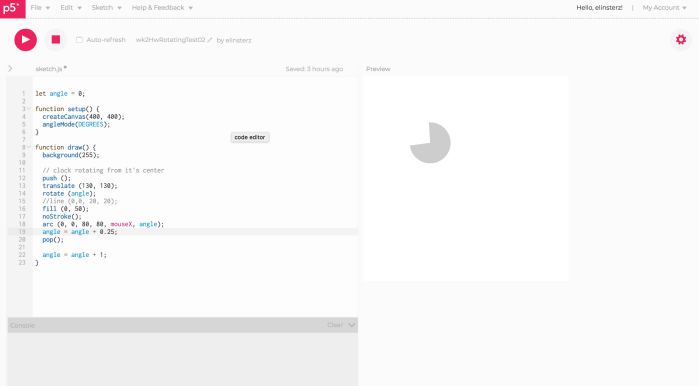
Screenshot 2018-09-15 12.21.20

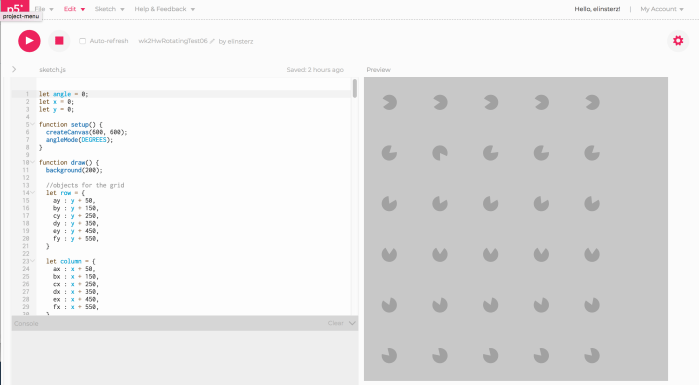
Next, I created a grid of these clocks using the objects to group columns and rows into their sections.
Screenshot 2018-09-15 12.21.04.png

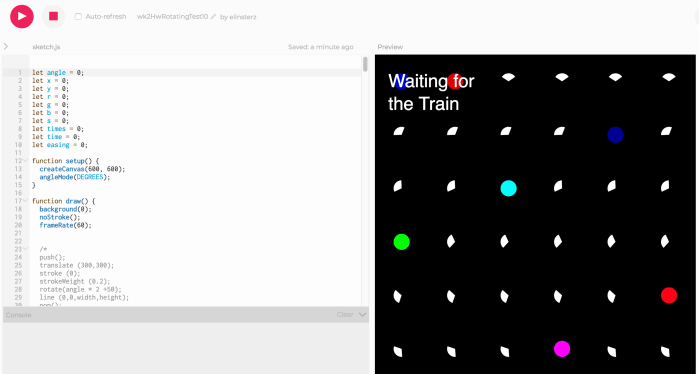
I’m trying to replicate this gif and get the arc to go reverse once it hits degree 350. I’m testing out the variable statement using (init, test; update) { statements}, but it isn’t working. It has been difficult trying to trouble shoot a lot of these interactive elements, and get it to look exactly how I want it to.
Screenshot 2018-09-15 12.42.49.png

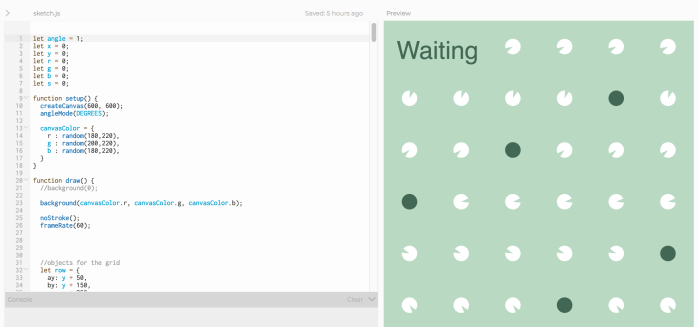
I tried to figure out why certain things weren’t working, but often times I ended up changing my vision. For example, I tried to get random sentences each time you refresh the page. I tried a couple of different solutions. For example, I tried to change the frameRate of just the random text and isolate the text using push() and pop(); however, it just changed the frameRate for all the moving parts. I ended up just using a static text.

I’m hoping to get some help at the help session with this and research some more about how to figure out how to get the text to change each time I restart the sketch. Overall, it has been fun to try and make things move and interact! I just need to keep practicing!!
Screenshot 2018-09-16 00.22.12.png

This is where the previous final result (before the help session): https://editor.p5js.org/elinsterz/sketches/ryIuBZj_7

—-
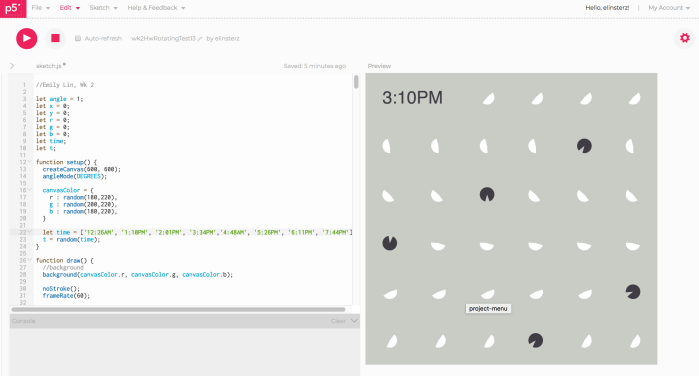
Update! I went to an ICM help session and they helped me figure out what was wrong. The issue was that I was mixing up where to put the arrays and where to define my variables – I should’ve put the “let time = [”]” and “let t = random(time)” in the function setup(), and put the “text (t, x, y)” in the function draw () or function mousePressed ().
Screenshot 2018-09-17 13.47.54.png

This is the new final result, where the time refreshes every time you click: https://editor.p5js.org/elinsterz/sketches/SkwB4v6d7

———

Reflections:

I can’t believe I didn’t figure it out my problem myself because the solution now seems so simple. But I’m realizing how great it is to ask for help and how important it is to be calm when I don’t get it right. Second eyes never hurts.

Right now, I think my skill level is not matching up with my ideas. It is a frustrating feeling to change what  I envisioned because I couldn’t get the code to work for me. I need to get better ASAP and have more patience to work out solutions. It is fun trying to figure it out, but after a couple times of it not working I can definitely tell I’m becoming more impatient. For me, the tricky part moving forward will be trying to write code that gets the results I want (and do so in a calm manner). It’ll be important that I be able to execute ideas with code (not just piece together random elements).

PCM Wk 1: Thoughts on the Readings + Videos

Reflections on “The Art of Interactive Design” by Chris Crawford

The quote “interactivity is superior to all forms of human expression in one way: it engages the human mind more powerfully than any other form of expression” makes a lot of sense. Interaction grabs our attention the way the way no other form of communication can.

Yet, this brings to mind the book “Flow” by Mihaly Csikszentmihalyi. In this book, he describes that people are at ‘flow’ when we are so grossly engaged with an activity that we lose our sense of self. However, some of his examples of moments in which people are most often at ‘flow,’ such as when they are playing piano or drawing, are not necessarily interactive in the definition that Chris Crawford described in Chapter 1. For example, is drawing interactive? Not really, right? The paper or pen is not necessarily effecting my actions; I am effecting and manipulating the pen completely to achieve my results. And yet this can be a very engaging form of human expression and does help people achieve ‘flow.’ Is Chris’s argument also implying that interaction helps us achieve ‘flow’ easier? I argue that it is possible to achieve ‘flow’ or total immersion even without interaction. For example, when person A is having a conversation with someone who is not fully paying attention or not actively responding, the conversation and level of interaction would suffer (as Crawford has mentioned). Then there is person B, who is in a quiet space and fully focused on sketching their graphic novel. I would say that person B is definitely engaging with the human mind and paying more attention to the task than person A. So isn’t a person’s level of engagement based on the quality of the interaction and the level of commitment of the person. In some cases, i.e. when a person is playing an amazing video game, interaction may reign supreme but in other cases when one side of the interaction is not up to par, it is not necessarily the superior form of expression to grab a person’s attention. I just think the quote mentioned above: “interactivity is superior to all forms of human expression in one way: it engages the human mind more powerfully than any other form of expression” is dependent on some other factors.

Chapter 1 Review Q+A:

  1. Are rugs interactive? Explain in your own words why or why not.
    Rugs are not interactive because they don’t respond to your action. They are not “listening” to your action and responding with their own action.

  2. Come up with your own damn definition of interactivity.
    Interactivity is when there is communication (listen, response, and action) between two or more actors. The participants’ actions are influenced by and depend on one another.


Reflections on “A Brief Rant of the Future of Interaction Design” by Bret Victor
I wholeheartedly agree with his argument that we need to imagine new and better technology that takes into account the amazing capabilities of our hands and bodies.

People learn by doing, and if people are limited to swiping the screen or clicking the mouse then they are ignoring all the possible forms of interaction that can help people learn and engage . I tried to think about his argument in relation to educational tools and spaces: exhibits, books, classrooms, etc. When I think about certain exhibits that are considered to be using “cutting-edge” technology, I find that many are still using touch screen tables (more swiping) in order to display information. When it comes to having people read or understand a subject matter in a very straightforward, no-nonsense way, the tablet or a piece of paper with text on it is probably still most suitable. But, personally, the most memorable moments has always demanded more dynamic and natural hand/body movements or at least a very cool and immersive environmental experience.


Questions on some of the videos:

  • Measuring Voltage
    • Tried to replicate the exact setup with the breadboard, but for some reason I couldn’t measure the voltage of the voltage regulator. I think it is a transistor not a regulator. how would I measure the voltage if it is a transistor?
  • Measuring Current, Resistance, and Conductivity
    • What is the pot of the potentiometer?
    • Just to be sure, if you put the black led through the top metal part of the voltage regulator that measures the ground? Is that correct?
  • Schematic Review
    • Polarized capacitors? I need to research more about what this is and how that differs from a capacitor.

ICM Wk 1: Mort Mort

For this assignment to draw an alien using p5.js, I am purposely trying to code based off of my drawing. The reason I am doing this is because I am hoping I’ll learn more if I try to code the actual result that I want, instead of creating a jumbling of shapes as I go along.

So, here’s my rough alien sketch before I started coding. Let’s try and recreate this with p5.js!

Alien_Sketch_20180904 EL 1.jpg

Starting to draw with p5.js and I am having to constantly remind myself of a couple of notes:

1.) “Think like a computer.” I keep placing objects underneath other objects. Ex: I have put the background statement as the first command in the function statement, therefore my objects are all hidden. Need to remind myself that commands read from top to bottom.

2.) Trying to remind myself to also not use the same method each time. Ex: I want to try out different ways of drawing ellipses with the different ellipseMode(). I just want to make sure I know of all the different techniques/commands, even if it takes longer. Hopefully this will help in the future.

3.) My struggles with making a unique, organic shape (the alien body)

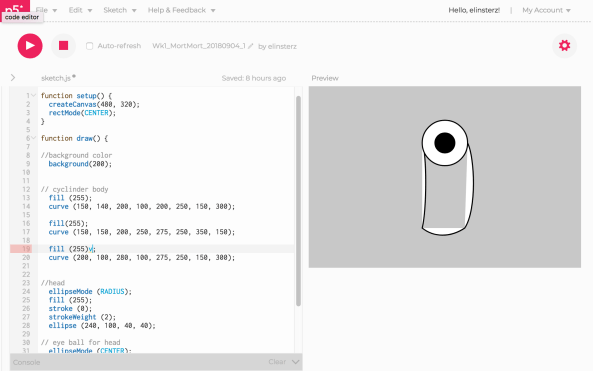
Reading the beziers page to help me get that cylindrical shape of the body. Finally got the cylindrical body shape, but am struggling to have the color fill on the inside not outside of the shape. Ex below:
Screenshot 2018-09-04 22.30.22

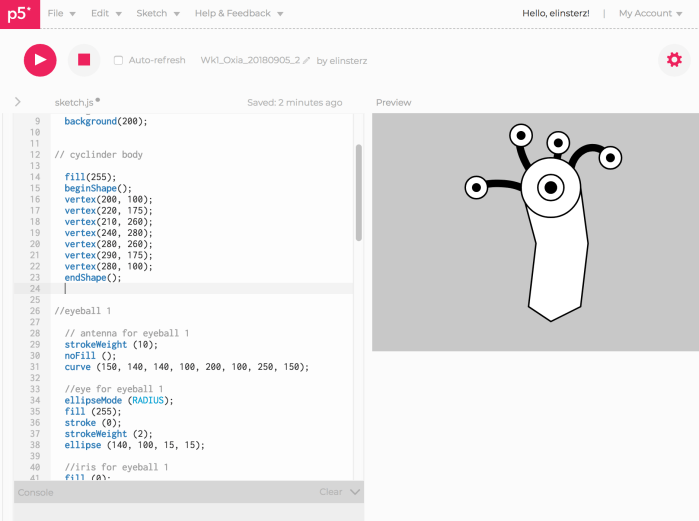
So bezier command doesn’t work for making an organic shape. Thankfully stumbled upon the beginShape() and vertex () function. It’s still not curved. Here is the vertex version:
Screenshot 2018-09-05 20.02.09.png So, I think I should apply this concept to the curve vertex function. However, I am very confused as to why the number of curveVertex() points and the number of points() are not the same. Should there be a curve for each point.
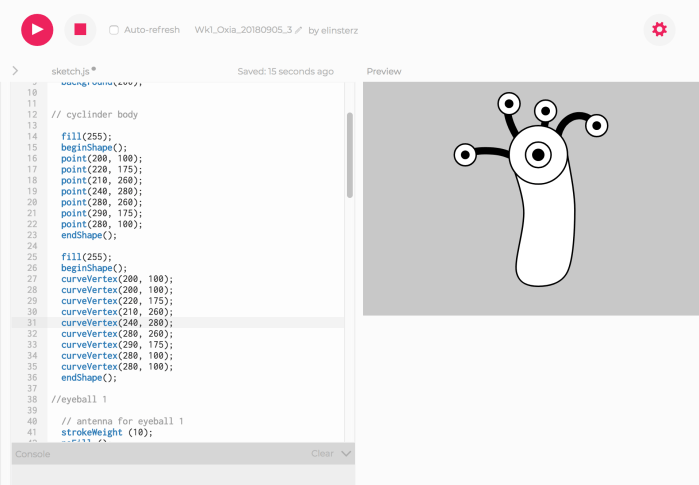
Ok, well despite not knowing, still was able to get a little closer using the curveVertex() function.

Screenshot 2018-09-05 20.10.12

5.) Throughout the building of the alien, I did wonder if there was an easier way to do things. Example, instead of having to draw a vertex point for the foot I was hoping I could just rotate a ellipse. When I tried to do this, it would end up rotating the whole alien. Also another example, making each polka dot took time, wonder if there’s an easier way. Trying to find an easier way to do things/ “shortcut” will be key for me.

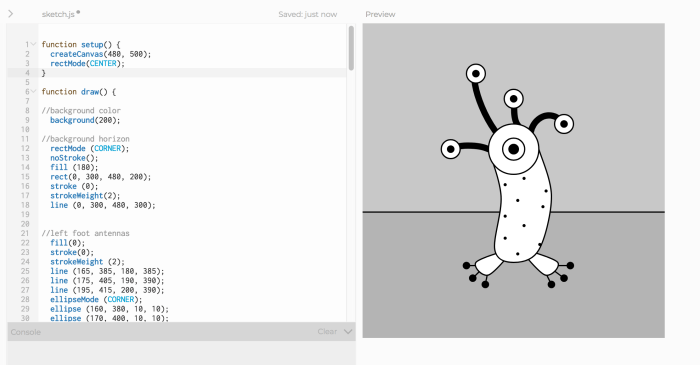
Though there’s probably an easier way to do some of these steps, I still managed to Updated version of the alien with all the body parts I had envisioned.

Screenshot 2018-09-06 15.06.58.png

6.) Added color! Easiest part!

Screenshot 2018-09-06 15.33.51

Here is the final result + code: https://editor.p5js.org/elinsterz/sketches/SygUGrhPm


Reflections on this assignment:

Only after finishing my alien did I realize we were only supposed to use basic shapes for this assignment. So, I didn’t follow the guidelines exactly but I do feel like a learned a lot.

It’s exciting to see the results. Throughout doing my alien, I did ask myself many times if there was a more systematic way of doing things. Instead of putting in individual dots, is there a way to make a pattern? Also, I found myself becoming more comfortable with using the p5.js reference page in order to figure something out.

I also kept itching to understand other commands, such as how to make a gradient background. I discovered lerpColor(), but couldn’t quite understand how it works. I can definitely tell I’m only scratching the surface of this program and I’m antsy to be more well-versed in it.

ICM Wk 1: How Computation Applies to Me

With my work and life, I hope to create educational experiences that help myself and others better understand a topic, a person’s point of view, and the world around us. This is why I’ve made it a point to find graphic design work opportunities that were not just about selling products to consumers. After graduating, I purposely tried to apply my love for graphic design and illustration towards organizations and studios that are committed to helping the world in some capacity. With this focus, I found myself working for an anthropology museum,  media/magazine companies, and a social impact design studio. All these experiences further confirmed my belief that collaborating with those who are passionate about their subject and their mission is key.

So, how will computation be applied to my purpose? I hope that with the help of technology and computation, I will be able to create more engaging and immersive learning experiences. I find that some of the most engaging pieces in the museum, media and magazine world are when they use computation and other types of media (video, animation). When used intentionally and beautifully, computation can truly transport people into a story and subject matter. Lately, many of the works that I found most inspiring involve programming in some way or another. Some examples of the editorial pieces that are amazingly engaging are these heartbreaking New York Times pieces (they’ve done so many but I’ll just post the ones I distinctly remember): Greenland is Melting Away, Antartica Dispatches.

The Refugee Project (not so much editorial, more data visualization) but still effective and still beautiful. This project maps the movement of those seeking and obtaining asylum in the world.

Smithsonian’s Interactive Fact Table and the Natural History Museum of Los Angeles’s Nature Lab are two great examples of technology being incorporated into the museum experience. This nature lab is such a perfect blend of illustration, design, objects, and technology. Children’s science and natural history museums are especially an interest of mine. My SO is a material scientist and I’ve learned to love and appreciate science; I only wish I knew more. These science and history exhibits are a fun way for me to learn about these topics in a playful and easily digestible way. And one thing I’ve noticed from these exhibits are that interaction is a key component to helping people learn.

I’ve been in awe of certain interactive pieces that I’ve experienced in person. Some pieces that are always in the back of my mind are: Ai Wei Wei’s Hansel & Gretel show. I was also in New York a couple years ago for the Ryoji Ikeda’s exhibit which was so unforgettably peaceful and mesmerizing. Although I don’t know if I’ll do work as awesomely minimal and experiential as this; I can’t imagine his work not effecting my choice to learn more about computing. More for spirit and aesthetic inspiration, Keetra Dean Dixon is a designer and artist who I’ve been following for years. Her work is tactile, playful and, best of all, it forces people into unexpected situations (be it a digital experience or not). I hope to infuse her sense of delight, absurdity, and humor into all that I dream of and work on.

I had my first Physical Computing course yesterday. During one part of the lecture, Tom Igoe described the 3 types of interactions that he generally sees at ITP: 1.) Expressive, 2.) Instrumental, 3.) Instructional. While I hope to make work that touches upon all of these, the interaction type that I connected to the most was the instructional kind. My goal is to use programming skills and all that I learn at ITP to help me be a better, more well-rounded designer, technologist, and collaborator for empathetic and educational causes!