Understanding Networks Wk 4: Definitions

WebRTC (Web Real Time Communication): is a free, open source project that enables web browsers with real-time communication capabilities. WebRTC doesn’t require any plug-ins or applications. The technology allows video, audio streaming, and data sharing between clients.

Routing: a process performed by network layer in order to deliver the packet. It chooses the optimal path from one network to another. 3 types of routing: a.) static routing, b.) default routing, c.) dynamic routing

  • Static routing: manually adding routers into routing table. Advantages of this are that it is more secure, there is no bandwidth usage, and there is “no routing overhead for router CPU which means a cheaper router can be used to do routing.”
  • Default routing: this routing doesn’t care about which network the packet belongs to. It will send all packets towards a single router that is configured for it to be sent to.
  • Dynamic routing:  this routing makes automatic adjustments of the routes according to the current state of the route in the routing table. When the router finds a change in the topology then the router advertises it to all the other routers. The advantage of dynamic routing are that it is more effective at finding the best route and that it’s easy to configure. Disadvantages are that is consumes more bandwidth and is less secure than static routing.
  • Reference: https://www.geeksforgeeks.org/types-of-routing/

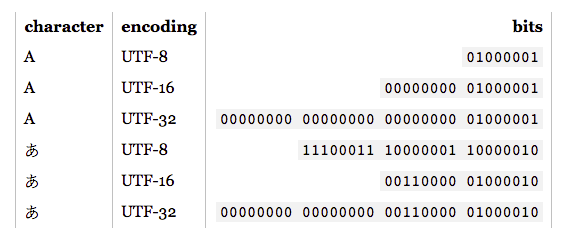
UTF: character encoding capable of encoding all possible characters (also known as code points) in unicode. UTF stands for Unicode Transformation Format.

TCP vs UDP: stands for Transmission Control Protocol (TCP)/ Internet Protocol (IP). UDP stands for User Datagram Protocol.

  • TCP
    • “TCP provides a way to deliver and receive an ordered and error-checked stream of information packets over the network.”
    • TCP is most commonly used protocol on the Internet
    • When you request a site, your computer sends TCP packets to the web server’s address. The server sends back a stream of TCP packet, which your web browser stitches together to form the web page.
    • TCP is very reliable! Packets are sent with TCP are tracked so no data is lost or corrupted in the transit.
    • It is able to be this reliable because it orders packets by numbering them. It error-checks by having the recipient send a response back to the sender saying that is has received the message.
    • Error correction built it/ more reliable –> but slower
  • UDP
    • “UDP is used by apps to deliver a faster stream of information by doing away with error-checking.”
    • “When an app uses UDP, packets are just sent to the recipient. The sender doesn’t wait to make sure the recipient received the packet – it just keeps sending packets.”
    • They can be lost, sender won’t resend them. Losing all the check-ins means faster communication time though!
    • “UDP is used when speed is desirable and error correction isn’t necessary.” Often used for live broadcasts and online games.
    • No error correction –> but so fast!
  • Reference: https://www.howtogeek.com/190014/htg-explains-what-is-the-difference-between-tcp-and-udp/


Joy + Games Wk 3: Game Manifesto

Live site: https://emilylin-itp.github.io/joy-n-games/dodo_manifesdo/index.html

Code: https://github.com/emilylin-itp/joy-n-games/tree/gh-pages/dodo_manifesdo

Assignment 2:As play designers intending to make joyful experiences, it’s time for you to articulate your own design values, which we’ll call your manifesto.”

With this manifesto, I focused mostly on writing about the ‘flavor of joy’ I’m hoping to create with games/ playful experiences. Manifestos are inspiring but it is hard for me to write with the same gusto and one-sidedness that they are often written in. Although my paragraphs ended up being manifesto-like, I still wanted to make the text feel impermanent. The paint splatter on mouse click came in handy for making the text feel less precious. While I do believe in what I wrote at this time, I also think that what I believe in could easily change and there are always multiple viewpoints to consider. Overall, it was fun to reflect on the type of playful experiences + game environment I hope to create this semester. I chose to communicate this via a website because I’m just trying to get better at coding websites- so why not take the opportunity to practice?! 

Live Web Wk 3.5: Coloring Book (NY Edition)

Code: https://github.com/emilylin-itp/live-web/tree/gh-pages/wk3/color-a-blank-code%20final

Try it out! http://el3015.itp.io:8080/index.html

Wk 3 Continued: 09/26/19 – 10/04/19 (version 2)

I decided to continue working on the collaborative drawing project from last week because it didn’t turn out how I had imagined. It’s also good to just get more socket practice! There are so many features I still want to add, but at some point I need to call it done and move on. So, it is done for now!

The issues I managed to resolve for this round: a.) having the user’s drawing and the image background scale together, b.) include different images to choose from like a coloring book, c.) also include different colors users could choose from, d.) get the redraw button to work, e.) colors remain the same color when user refreshes

Thank you: Biggest thank you to Professor Shawn for solving the black line issue and resident Dan for helping me figure out why the color was not emitting for the other user properly. Just amazing!

Helpful References: 

Live Web Wk 3: Transmitting Other Datatypes

Wk 3: 09/18/19-09/25/19 (version 1)

I didn’t give myself enough time this week to execute something I’m happy with.  In it’s current state, the site is a mess and drawing in it is not easy. Hoping to improve upon this for the coming week.

The redo button also clears the canvas but doesn’t do it for everyone, though it is using “socket.emit”

Code: https://github.com/emilylin-itp/live-web/tree/gh-pages/wk3/wk3_wig


Helpful Resources:

Command Lines to remember:

npm install socket.io --save
npm install express --save
npm init
more filename.txt (to read what is in the file)
touch filename (to make a file)
Npm install json
sudo npm install -g forever
forever start server.js
forever list

Data Art Wk 2-3: Self Portrait

Live site (turn volume on): https://emilylin-itp.github.io/data-art/wk2-3-hw/self_portrait_data/index.html

Code: https://github.com/emilylin-itp/data-art/tree/gh-pages/wk2-3-hw/self_portrait_data

I documented every time I said ‘sorry’ in the course of a week. I wrote down who I said it to, why I said it, when and where it was said. Pretty sure I missed a couple sorries here and there, but I tried my best to be diligent and honest about my recordings. After a week of collecting, I converted my notes into a json file and created a site to express this data. The json file is retrieved by using ajax xmlhttprequest, which I then parsed and pushed into arrays for each day. Still trying to figure out how to make more dynamic sites, but it was good fun trying to make this all in vanilla js. 

Note: this website is not mobile-friendly. It also doesn’t look good beyond 2560 x 1600. Need to learn how to make sites more responsive!

Credit: Thank you to Genevieve for the thoughtful feedback and coding tips post assignment!

—-

Some questions:

  • Could I have used switch states instead of so many nested if statements for the mouse on part? how to properly use switch states?
  • I have a style sheet per html page? Is this the right way to do things? Stack overflow people say it’s fine to have more than one stylesheet, but there could be an easier way?

Helpful Resources: 

Joy + Games Wk 2: Aesthetic Game

Whose Is This? Game

How the Game Works:

  • There is one judge per round. The judge chooses a theme at random from a deck of themes. The themes are usually abstract and not literal (i.e. “dramatic”, “political”, “gooey”, “sadness”, “goofy”). The judge will not draw for that round.
  • The players draw their version of the theme within 30 seconds.
  • After 30 seconds, the drawings are shuffled.
  • The judge then tries to match the drawing with the person who drew it. Only 30 seconds for matching.
  • If the judge matches correctly, then they keep the drawing. If the judge matches incorrectly, the player whose drawing is mismatched keeps the card.
  • The goal of the game is to have the most drawings collected by the end.

Rules:

  • Players only have 30 seconds to draw
  • Judge only has 30 second to match
  • Judge can not draw

Image below: 3 players’ version of “Hairy.” The judge is choosing whose drawing belongs to who.

img_7538.jpg

Live Web Wk 2: Socket io Chat

Final code: here.
Try it out here.

Assignment: Get up and running with Node.js on Digital Ocean and the example Chat Application. Try to extend it a bit, make it better, more fun.

Tushar and I worked on this together. We wanted to make chat messaging more silly, so we came up with turning people’s messages into comprehensible gibberish (kinda like adding static to communication). He focused on the socket io/ client to server communication. I focused on randomizing the message in js and the html+css.

User Experience:  a.) person types in user name to be able to access chat function, b.) socket.io pairs person with only one other person (if there is an odd number then that person must wait for another person to join, c.) people type away, hopefully not knowing that their messages are actually gibberish to the other person.

Helpful Resources:

Resources mentioned in class:

Data Art Wk 1: Tree Rings

Assignment: Visualize a data set in at least three ways. Choose to work with a different visual element, drawing inspiration from gestalt principles.

Code for all three live here.

a.) Line Graph: https://emilylin-itp.github.io/data-art/wk1-hw/tree_rings_line/index.html

b.) Rings + Heat Map: https://emilylin-itp.github.io/data-art/wk1-hw/tree_rings_ellipse/index.html

190916_tree_rings_ellipse.png

c.) Bar Graph: https://emilylin-itp.github.io/data-art/wk1-hw/tree_rings_bargraph/index.html

Notes:

It was a fun challenge trying (but failing) to create data visualizations that weren’t completely influenced by what I’d seen from my peers who had completed this assignment already ( I joined the class a week late). I don’t think it’s drastically different from what’s already out there but I did have a good time trying to push the interactivity on two of these. The biggest challenge was trying to code that interactive bar graph (c). I got stuck figuring out how I could select one data point at a time. For this, I reached out and got logic advice from a resident and friend.

Understanding Networks Wk 1: Set up Linux Host

Raspberry Pi Setup using Tutorial

YAY! Installed node and able to connect to sandbox! Biggest shoutout to Tom Igoe and Tushar for all the help!

Questions + Answers + Notes:

  • Q: Does raspberry pi have it’s own memory? I noticed the “wpa_supplicant.conf”  file is not in the sd card when I read it from my computer. Is it stored on the raspberry pi?
  • Q: Difference between ESSID and SSID? Is it a problem if the ESSID is “off/any”example of whats happening
    • A: ESSID is the same as SSID; the issue is that “ESSID: off/any” means that the internet is not connected.
  • Q: why was my pi not able to connect to the sandbox370?
    • A: 1.) wrong sanbox password, 2.) not putting “sudo” in front of “ifconfig” command when you are logged into the pi
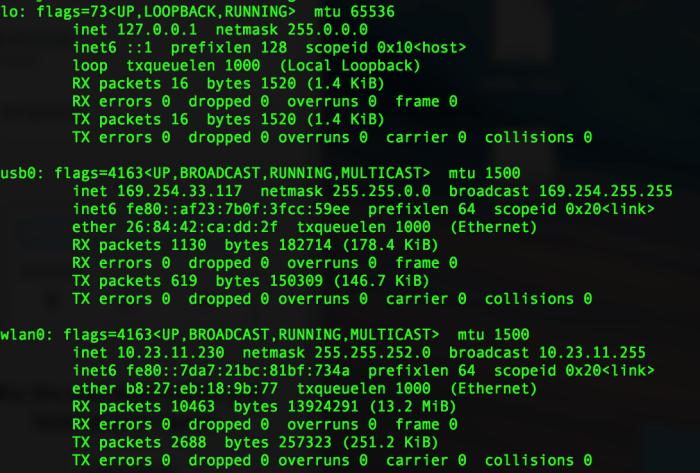
  • Note: when you run “sudo ifconfig”, and notice that the wlan0 (which is the wifi card) does not have an ip address with “inet” –> means not connected to wifi yet.Screenshot 2019-09-12 14.01.58.png
  • Note: “ifup activates a network interface, making it available to transmit and receive data.”
  • Note: “ifdown command disables a network interface, placing it in a state where it cannot transmit or receive data.”
  • Note: for installing node to raspberry pi via command line: https://stackoverflow.com/questions/32563173/installing-node-js-on-raspberry-pi-2
  • Note: IP deals with packets; TCP enables hosts to establish a connection and exchange streams of data


References found along the way: 

https://lb.raspberrypi.org/forums/viewtopic.php?t=112027http://www.circuitbasics.com/raspberry-pi-wifi-installing-wifi-dongle/https://www.raspberrypi.org/forums/viewtopic.php?t=193941
https://www.digitalocean.com/docs/droplets/how-to/connect-with-ssh/
https://raspberrypi.stackexchange.com/questions/100598/ufw-and-iptables-on-buster
https://stackoverflow.com/questions/32563173/installing-node-js-on-raspberry-pi-2

Understanding Networks Wk 1: Reading Notes

Personal Notes

“Linked” Chapter 1-4:

  • QS: Since different networks probably follow different rules, it seems like Erdos and Renyi’s idea that nodes are connected randomly is an oversimplification of a complicated system?
  • By the end of chapter 4, we find out that people now think that networks are a combination of the two models (cluster formation, but links are random). Does this model exist for other networks? Albert Lazlo foreshadows that his research does not reveal this to be true for the Internet. I am curious to know how his research could be drastically different. 
  • QS: Is it possible that there is not only one overarching model that ALL networks follow? Couldn’t there be certain networks that look like one type of model, and another network look like another? I can imagine social networks being very different from molecular structures, even if they do have cluster formations. Do most scientists and mathematicians believe that there must be only one main model that all networks follow? Or is this something that they are trying to figure out?
  • “If the network is large, despite the links’ completely random placement, almost all nodes will have around the same number of links”
    • QS:  What is considered a large number though? Large depends on context, when does a network become considered large? Doesn’t a large network also depend on the type of network?
  • QS: the book mentioned in Chapter 3 that we would need a map of the full web, and nobody has one. Is this still true? How would one obtain a map, using robots/crawlers? What is limiting our current ability to get a full map? Is it the fact that billions of new urls and nodes are formed everyday? Is there another reason?
  • After reading these chapters, I am left wondering: does the internet work the same way as networks in society?

Why Google Went Offline Today and a Little Bit About How the Internet Works

  • Why is that no one from Moratel know how to check if they are receiving and announcing incorrect routes? Why is it that Cloudfare needs to do this task? What is Moratel not checking themselves? 
  • “Peering” is mentioned in the article but never explained? “Moratel immediately shutdown the BGP peering with Google after contact was made…” 

325 Hudson

  • Purpose: “325 Hudson provides a stable long term neutral and cost effective environment for global and domestic network operators”
  • QS: “Meet Me Room”: best place to get connected
    • Why do they look like big black boxes? What is the reason behind the design of these?